PREMIUM VALHEIM CHEATS

Valheim Cheats for PC. Player, Ore, Boss, Ship & Creature ESP.

Explore our Valheim Cheats for PC with Player, Ore, Boss, Ship and Creature ESP. Track players and creatures, identify valuable ore locations, monitor bosses and ships, and customize your gameplay awareness. Save configurations per server and use the stream-proof overlay for a cleaner viewing experience.

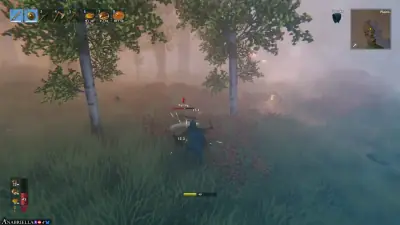
Valheim character exploring the Meadows at night.

Yes

Stream-safe

<24h

Patch speed

300+

Users

24/7

Support

Player ESP
Ore ESP
Boss ESP
Creature ESP
Ship ESP
Ranged aim
Stream-proof
Cloud DMA
Per-server configs
Windows 10 & 11
HVCI enabled
Core Isolation enabled
TPM enabled
Secure Boot enabled
Cloud DMA required for full functionality on supported builds
Player ESP
Ore ESP
Boss ESP
Creature ESP
Ship ESP
Ranged aim
Stream-proof
Cloud DMA
Per-server configs
Windows 10 & 11
HVCI enabled
Core Isolation enabled
TPM enabled
Secure Boot enabled
Cloud DMA required for full functionality on supported builds

Features

Everything You Need to Own the Meadows, Mountains and Beyond

Spot players, ore, bosses and ships before they spot you. Every tool is built around how Valheim is really played, from late-night raids to long resource runs.

Player ESP

See every threat before it arrives

Know who is nearby and where they are heading, even through terrain and walls.

  • Player boxes with name and distance
  • Clear visibility through terrain and structures
  • Adjustable colors and render range
  • Built for raids and base defense

Ore ESP

Find the good stuff faster

Skip the endless wandering and head straight to the deposits that matter.

  • Copper, tin, iron, silver and more
  • Distance readout on every marker
  • Filter by ore type to cut the clutter
  • Ideal for fast, efficient gathering runs

Boss ESP

Never lose track of the big fights

Keep an eye on boss locations so you can prepare gear, food and your crew with confidence.

  • Boss markers with live distance
  • Easy to read at long range
  • Customizable label style and color
  • Plan your approach before the fight begins

Creature ESP

Know what is lurking out there

Track wildlife and hostile creatures so surprises stay on your side of the fence.

  • Hostile and passive creature markers
  • Distance and name display
  • Toggle categories on or off
  • Useful for hunting, exploring and sailing

Ship ESP

Keep your fleet and rivals in sight

Spot ships across the water so you always know who is sailing near your coast.

  • Ship markers with distance
  • Easy tracking of your own vessels
  • Clean overlay that stays out of the way
  • Great for ocean travel and coastal defense

Precision Aim and Recoil Control

Steady hands for the moments that count

Ranged aim and recoil tuning give you an edge when PvP gets serious.

  • Smooth, adjustable ranged aim
  • Recoil tuning to match your playstyle
  • Fine control over strength and behavior
  • Made for tense player fights

Stream-Proof Overlay

Your overlay, your eyes only

The ESP and menu stay hidden from OBS, Streamlabs and most capture tools, so your stream shows only the game.

  • Overlay hidden from common capture software
  • Safe to use while recording or streaming
  • Clean, readable menu on your screen
  • No visual clutter for your viewers

Cloud DMA Support

Full functionality on supported builds

Cloud DMA unlocks the complete feature set, with an external loader that keeps things separate from the game.

  • Required for full functionality
  • External loader setup
  • Windows 10 and 11 supported
  • Setup help available through tickets and Discord

Per-Server Configs

Set it once, play it everywhere

Save your preferred settings for each server so you never have to rebuild your setup.

  • Configs saved per server
  • Quick switching between setups
  • Tweak colors, ranges and filters
  • Updated after major game patches

Store

Our products

Compare the cheat menu and the utilities on this grid. Open a product page for the feature list and checkout.

Valheim Cheats

Explore the Valheim feature set, Windows requirements and separate Cloud DMA setup.

Player, Ore, Boss, Ship and Creature ESP, ranged targeting and per-server configurations.

  • Player ESP
  • Ore ESP
  • Boss & Creature ESP
  • Ship ESP
  • Stream-proof overlay

HWID Spoofer for Supported Games

Disk serials, MAC addresses, and GPU IDs get a new pass. The cleaner in the license runs before the next sign-in.

After a hardware flag, this license rewrites disk serials. It also rewrites MAC addresses, GPU IDs, and related fingerprints. Trace cleanup is in the same license.

  • Disk serial rewrite
  • MAC rewrite
  • GPU ID rewrite

Cloud DMA

A Hyper-V environment for one Windows PC with guided installation and encrypted activation.

Cloud DMA requires GREENWARD, Static Server and AWS as separate purchases. Confirm the full setup and Valheim compatibility before ordering.

  • Single-PC setup
  • Guided Hyper-V installation
  • Encrypted activation

Why us

Features and support for Valheim

Explore the targeting controls, visual tools and product guidance available before checkout.

  • Player ESP

    Know who is nearby and where they are heading, even through terrain and walls.

  • Ore ESP

    Skip the endless wandering and head straight to the deposits that matter.

  • Boss ESP

    Keep an eye on boss locations so you can prepare gear, food and your crew with confidence.

  • Ship ESP

    Spot ships across the water so you always know who is sailing near your coast.

  • Stream-Proof Overlay

    Record gameplay in OBS or Streamlabs without including ESP markers or menus in the capture.

  • Cloud DMA Support

    Full functionality requires Cloud DMA. Review its Windows requirements and separate purchases before ordering.

<24h

Patch turnaround

Usual time to ship a loader after a big Valheim update.

24/7

Support

Discord help for setup, configs and account issues.

300+

Users

PC players using aimbot, ESP and tools on valheimcheat.net.

Setup guide

Before ordering, review your complete setup

Read the feature list and requirements, confirm unresolved compatibility questions, then review the destination checkout.

  1. Review the feature list

  2. Confirm compatibility

  3. Review purchase options

How it works

From product research to an informed purchase.

Review the complete configuration before choosing an access option.

4 checks before purchase

  1. 01

    Read the feature list

    Review targeting, ESP and interface options on the main product page.

  2. 02

    Check your Windows setup

    Check Windows 10 or 11 and the required HVCI, Core Isolation, TPM and Secure Boot settings.

  3. 03

    Ask about the complete configuration

    Confirm where Valheim runs with Cloud DMA and account for GREENWARD, Static Server and AWS.

  4. 04

    Review the destination checkout

    Check current pricing, access terms and delivery details with the seller before paying.

Blog

Guides and updates

Feature explanations, Windows requirements and gameplay guides for Valheim.

Hyper-V needs three things to line up: firmware, Windows edition and the feature itself. Here is how to check each one.

No cheat is risk free. Here is a straight look at what can go wrong in Valheim and what to check before you buy.

What to check at the destination checkout before choosing access to Valheim Cheats, including billing terms, setup requirements and companion purchases.

System requirements

Check your PC before purchasing

Review the Windows security settings and separate requirements for the supported configuration.

Windows Compatibility

Windows 10 or Windows 11, 64-bit.

Windows Security

HVCI and Core Isolation must be enabled.

Firmware Security

TPM and Secure Boot must be enabled.

Cloud DMA Requirement

Required for full functionality on supported builds. Purchased separately.

Support

Need a hand with your setup?

Find answers to common questions or contact support about an order, compatibility, or a technical issue.

Before you reach out

Details that help us help you

  1. 01

    Order details

    Include your order number when asking about a purchase.

  2. 02

    Your setup

    Name the product and your Windows version.

  3. 03

    What happened

    Share the exact error message or a relevant screenshot.

FAQ

Questions about this page

Answers for this page. The FAQ page holds the rest.